How to compress a PDF so it fits in an email
Most email services refuse attachments over 20–25 MB. Here is how to shrink a PDF enough to send it, without making it unreadable.
You have finished the document, you click "Attach", and the email program says the file is too big. It is one of the most common PDF problems, and it usually has a simple fix: compress the PDF before you attach it.
This guide explains why PDFs get so large, how much smaller you can realistically make them, and how to do it step by step without uploading a private document anywhere.
Why is my PDF so big?
A PDF's size is mostly decided by what is inside it, not by how many pages it has. A 200-page contract that was exported from Word can be smaller than a 3-page document you scanned on a phone.
The usual reasons a PDF is large:
- Scanned pages. Every scanned page is a full photograph of the paper. A colour scan at high resolution can easily be 1–3 MB per page.
- Photos inside the document. A report with a few camera photos often carries the full-size originals, even if they are shown small on the page.
- Embedded fonts. Documents that use many fonts include a copy of each one.
- Leftovers. Some programs keep old versions of edited pages, thumbnails or hidden data inside the file.
Text and vector drawings (lines, charts, tables) are tiny. That is why compression helps most with scans and image-heavy files, and least with plain text documents that are already small.
How big is too big for email?
Limits vary, but common ones are:
| Service | Typical attachment limit |
|---|---|
| Gmail | 25 MB |
| Outlook.com | 20 MB |
| Yahoo Mail | 25 MB |
| Many company mail servers | 10 MB |
Remember that attachments grow by about a third when they are sent (they are encoded as text), so a 19 MB file can already fail on a 25 MB limit. Aiming for under 10 MB is a safe target for almost everyone you might write to.
Step by step: compress a PDF in your browser
- Open Compress PDF.
- Drag your PDF onto the page, or click to choose it.
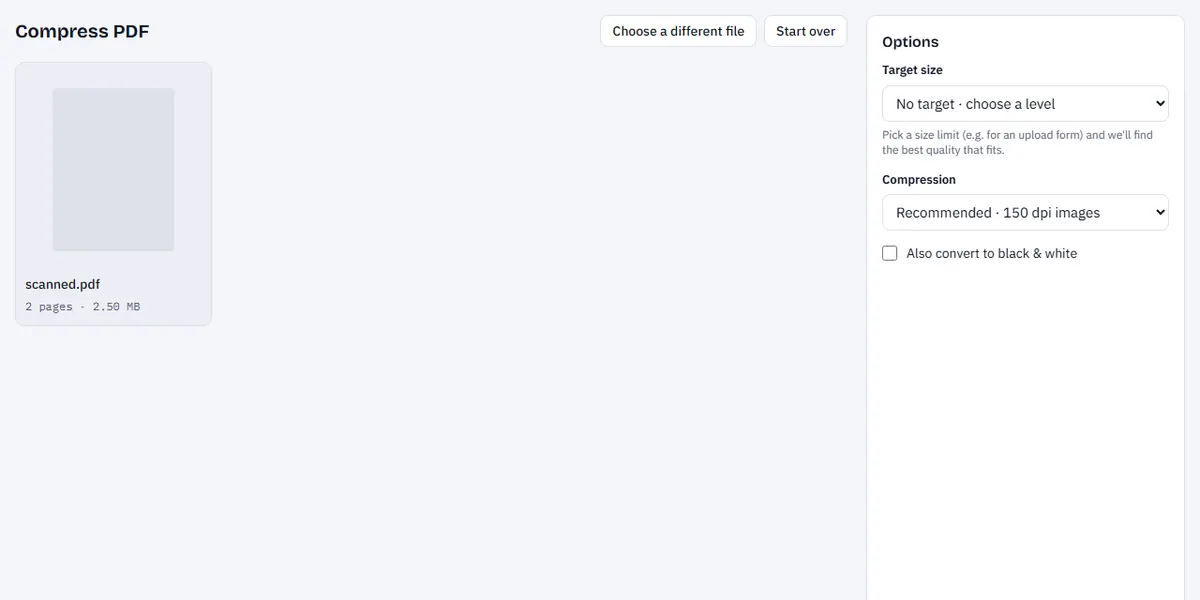
The Compress PDF page with a file added and the level options visible.
- Choose how to compress:
- A target size, such as Under 1 MB or Under 500 KB. The tool tries quality settings from best to lightest until the file fits.
- A level: Light keeps the text selectable and only tidies up the file; Recommended and Strong redraw each page as an image at 150 or 100 dpi, which shrinks scans and photo-heavy files a lot.
- Click Compress PDF and look at the size before and after.
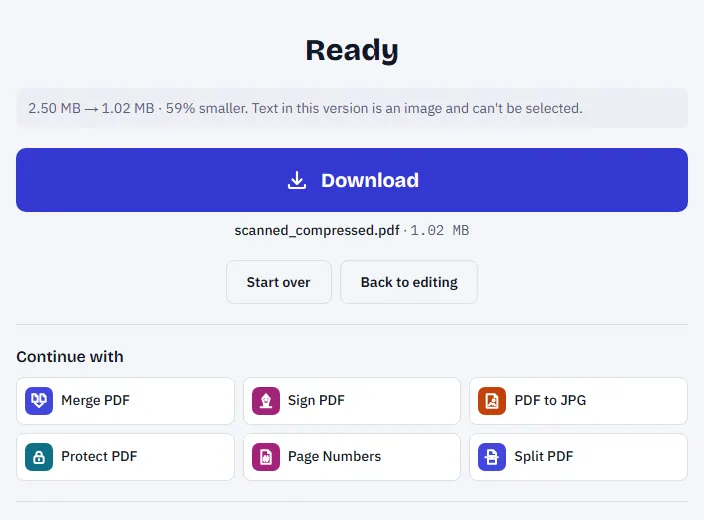
The result showing the original size, the new size and the download button.
- Download the smaller file and attach that one to your email.
The compression runs on your own device. The document is never uploaded, which matters for the kind of files people usually need to email: payslips, passports, bank statements and contracts.
Which setting should I choose?
Start with Light. If the PDF came from Word or another program, Light is often enough, and everything stays exactly as it was: selectable text, sharp lines, working links.
Use Recommended for scans. If the PDF is a scan or full of photos, Recommended makes the biggest difference while staying easy to read on screen and in print.
Use Strong or a small target only when you must. Strong and the 100–200 KB targets are meant for strict upload forms. Pages become lower-resolution images, which is fine for reading but not for printing posters.
One trade-off to know about: Recommended and Strong turn each page into a picture. After that, you can no longer select or search the text. If you need the text later, keep the original file, or run the compressed one through OCR PDF.
What if it is still too big?
Some files can't be squeezed enough without becoming unreadable. Two other ways out:
- Split the document. Split PDF has a By file size option: enter 10 MB and it cuts the PDF into parts that each fit, measuring the real size of every part. Send them in separate emails.
- Remove what you don't need. Blank backs from a double-sided scan, duplicate pages and appendices you don't have to send all add weight. Remove blank pages and Remove pages take care of that.
Turning colour into black and white also helps a lot with scans of plain documents: Compress PDF has a black-and-white option, and there is a separate black & white tool.
Why the compressed file can come out bigger
Occasionally the "compressed" file is larger than the original. That happens when the PDF was already well optimised: there is nothing left to remove, and redrawing pages as images adds weight instead. The tool tells you when this happens. In that case, the original is the best file to keep, and splitting is the better route.
A quick checklist before you hit Send
- Open the compressed PDF and scroll through it. Are small print and signatures still readable?
- Check the page count matches the original.
- Rename the file to something the recipient will recognise, like Invoice-May-2026.pdf.
- If the document is sensitive, consider adding a password with Protect PDF and sending the password by text message, not in the same email.
Frequently asked questions
Does compressing a PDF reduce quality? Light compression doesn't change what you see. Stronger settings lower the resolution of page images, which is usually invisible on screen but can show when you zoom in or print.
Is it safe to compress a confidential PDF online? With Compress PDF on this site, the file is processed in your browser and never uploaded. With other services, check their privacy page to see where files go and how long they are kept.
Can I compress several PDFs at once? Compress them one after the other; each takes only seconds for normal documents. If they belong together, you can also merge them first and compress the single result.
What is the smallest a PDF can get? It depends on the content. A one-page text document can be a few kilobytes; a scanned page rarely goes much below 50–100 KB while staying readable.
Try it now: Compress PDF